
Making the jump from web to mobile development


JavaScript in a browser runs anywhere a browser does. Mobile does not work that way. Each platform has its own language, its own toolchain and its own rules about what an app may do, and you have to decide how much of that you want to take on directly.
Writing for one platform at a time
Native development means Swift or Objective-C for iOS, and Kotlin or Java for Android.
| Advantages | Trade-offs |
|---|---|
| Direct access to platform features such as the camera, GPS and notifications. | A separate codebase per platform, which costs more time and money. |
One codebase, native output
Cross-platform frameworks let you ship to several platforms from a single codebase while still using native capabilities.
React Native
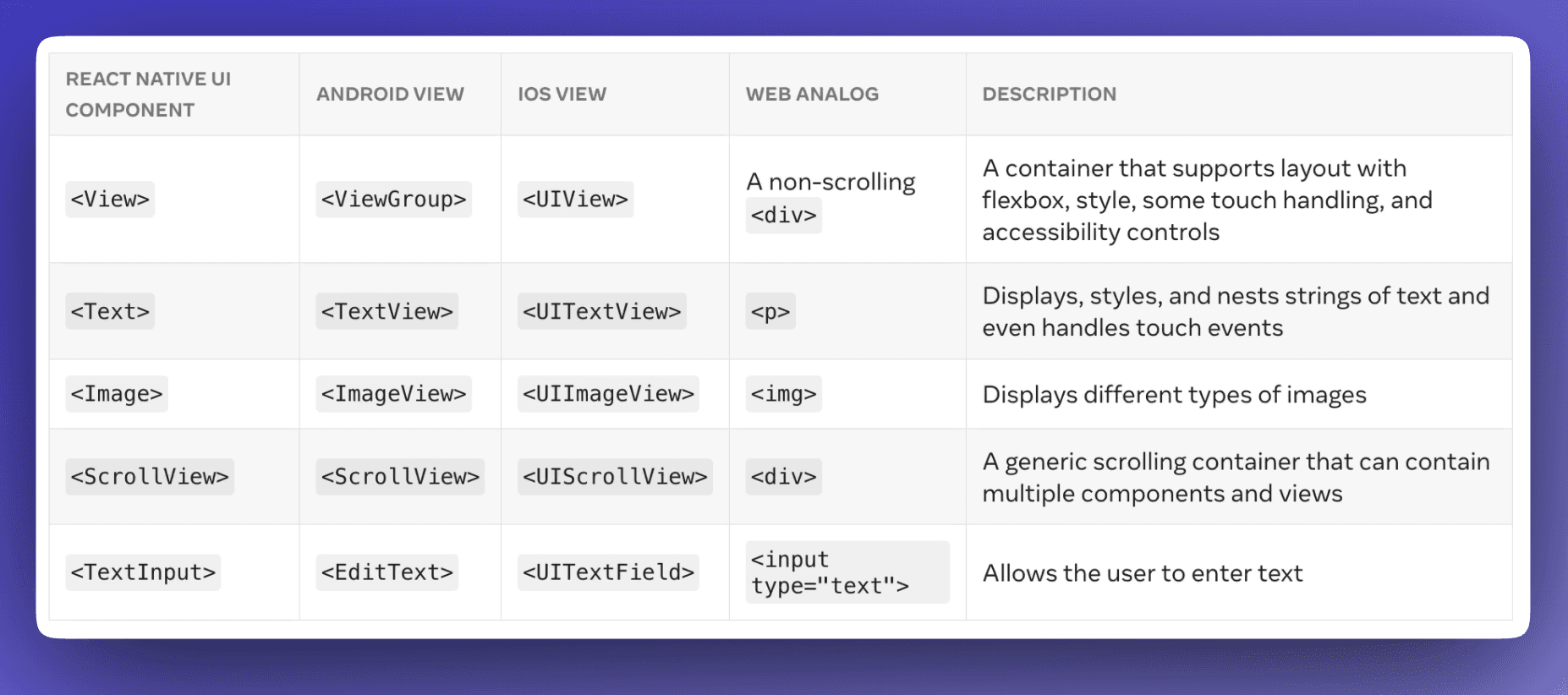
React Native is a JavaScript framework from Facebook, built on React, which makes it a short step for anyone who already writes React. Instead of HTML elements you use native components such as <Text>, <View> and <TextInput>, which behave like their platform counterparts. It targets iOS, Android and web.
Flutter
Flutter is Google's cross-platform framework. Apps are written in Dart and can target iOS, Android, web and desktop on Windows, macOS and Linux. It compiles to native ARM code, which is what gives it fast startup and smooth animation.
| Advantages | Trade-offs |
|---|---|
| You build a feature once rather than once per platform, so releases are faster and cost less. | Some native features are not exposed and still need per-platform code, which slows that particular feature down a lot. |
| The framework handles most of the behavioral differences between platforms, so you spend less time reconciling them. |
Choosing between them
The decision usually comes down to what the project needs, how long you have, what the budget is, who the app is for, and what your team already knows. There is no default answer; it depends on which of those constraints binds hardest for you.
Leaving native behind
Non-native development uses HTML, CSS and JavaScript to build something that runs in the browser rather than as an installed app.
Web apps are delivered through a URL. They are more limited than native apps because they can only reach what the browser's API exposes.
Progressive web apps are web apps built to behave more like installed ones. They can support offline use, push notifications, and launching from the home screen.
Testing before you ship
Both stores give you a way to put builds in front of people before release, and Google's has three tiers.
Internal testing distributes to up to 100 testers. You upload straight to the Play Console and send invitations, which makes it the fastest way to get a build into someone's hands.
Closed testing runs against a list of testers you control, which suits feedback from people outside your team. You can manage that list through Google Groups.
Open testing is public. Anyone can join, which makes it the right tier for an open beta and for finding out how the app behaves on hardware you do not own.
TestFlight is Apple's equivalent for iOS. It handles distribution to testers, reports crashes, and gives you usage analytics, and its review step for beta builds is lighter than full App Store review.
Submitting
Once testing is done, the store wants your app to meet its content and design guidelines, and it wants the listing filled in: descriptions, screenshots and the rest of the metadata people see before they install. Then it goes for review.
The first submission is the part that feels least like web work. There is no deploying on a Friday afternoon. Someone at Apple or Google looks at your build and decides, and you plan around that.