
How Much Does It Cost to Make an App in 2026?

Most answers to this question give you a range so wide it is useless, something like five thousand to half a million dollars. That is technically true and tells you nothing about your app. The price depends far less on the app than on who builds it, so this guide breaks the cost down by route, with a source for every number.
The short answer: a simple app costs about $10,000 to $50,000 through an agency, roughly $5,000 to $12,000 through a freelancer, a few hundred dollars a year on an AI app builder, and under $1,000 a year in fees if you build it yourself with a coding agent. Everyone also pays Apple $99 a year and Google $25 once to publish.
Put your own numbers into the calculator below, then read on for where each figure comes from.
How much does it cost to make an app? The four routes
All prices in this article are as of October 2026 and in US dollars.
| Route | What you pay up front | First-year total (simple app) | Who writes the code |
|---|---|---|---|
| Agency | $10,000 to $50,000+ | $10,000 to $50,000+ | The agency |
| Freelancer | $5,000 to $12,000 | $5,500 to $12,500 | One developer |
| AI app builder | $0 to $25 a month | $300 to $1,000 | The builder, inside its platform |
| Starter kit + your own coding agent | One payment for the kit | Under $1,000 plus the kit | Your agent, in a repo you own |
The first-year totals include the fixed costs covered further down: store fees, a backend and some AI usage. Here is how each route gets to its number.
Hiring an agency
Agencies are the most expensive route and the most hands-off. You describe the app, they design, build, test and usually submit it.
Clutch, which collects verified project reviews from agency clients, puts the most common mobile app project budget at $10,000 to $49,999, with an average project cost of about $90,780 and a typical timeline of around 11 months. The average is pulled up by large projects; the common case is the range. Agency Netguru publishes its own figures: $15,000 to $50,000 for a simple single-platform app, and $25,000 to $60,000 for an MVP with core features only, at blended rates of $100 to $150 an hour.
What you get for that money is a team and a process. What you do not get is speed on changes: every change after launch is another invoice, and you depend on them to make it.
An agency is the right call when you have funding, no time, and a scope you can write down precisely.
Hiring a freelancer
A single freelance developer costs a fraction of an agency, because you are paying one person rather than a team with overheads.
Upwork reports a median rate of $27 an hour for app developers, with most charging between $18 and $39. Those are marketplace-wide numbers that include developers from lower-cost regions. Expect to pay well above that for someone based in the US or Western Europe.
Hours matter as much as the rate. Thinkmobiles breaks a basic MVP down to a minimum of about 300 hours across planning, design, backend, app development and screens. At Upwork's typical rates that is roughly $5,400 to $11,700, before the inevitable extra rounds of changes.
The risk with a freelancer is not the price. It is that one person holds all the knowledge of your codebase, and if they move on you inherit code you did not write and may not understand. Ask for the repository in your own GitHub account from day one.
Using an AI or no-code app builder
App builders charge a subscription and generate the app for you from prompts or a visual editor. Entry plans are cheap:
| Builder | Entry paid plan | What it includes |
|---|---|---|
| Lovable | $25/month (Pro) | 100 monthly credits, plus daily free credits |
| Bolt | $25/month (Pro) | 10M tokens a month |
| Bubble | $59/month (Starter, billed annually) | Web and mobile, 5 mobile build submissions a month |
Prices as of October 2026.
Twelve months on a $25 plan is $300. In practice most people spend more, because credits run out during the busy weeks and the next tier up costs double. Bubble's mobile plan is pricier but includes app store build submissions.
The bigger question is not the subscription. It is whether the builder produces a native app you can put in the App Store and Google Play, and whether you can take the code with you if you leave. Some builders produce web apps first, some export real projects, some keep the app on their platform. We compared them in the best mobile app builders and looked at one in detail in can Lovable make mobile apps.
Builders are genuinely good for testing an idea in an afternoon. They get harder when the app needs subscriptions, native features or a backend you control.
Building it yourself with a coding agent and a starter kit
This is the route behind the search "how much does it cost to make an app yourself", and in 2026 it looks different from even two years ago. A coding agent such as Claude Code, Cursor or Codex now writes most of the code. Your costs are the agent, the fixed fees below, and optionally a starter kit so the agent is not building sign-in, payments and store setup from nothing.
The agent itself costs about $20 a month at the entry level: Claude Pro is $20 billed monthly and includes Claude Code, and Cursor Pro is $20 a month. Twelve months is $240.
The starter kit is a one-time purchase. NativeExpress, ours, is a React Native and Expo codebase with sign-in, RevenueCat subscriptions, AI features, push notifications and store build profiles already wired, plus instructions written for your agent. You own the source on GitHub.
It makes the setup and deployment of our projects more efficient, saving us both time and money.
 Malte HerbergCTO at TerraOne
What this route really costs is your time. Your agent writes the code, but you still make the product decisions, sign in to Apple, Google, Supabase and the rest when asked, and test every build on your phone. You do not need mobile experience, but you do need to stay with it until the app is through review. Our step-by-step guide to making an iPhone app shows what that looks like in practice.
The fixed costs everyone pays
Whichever route you pick, the app needs the same things to exist in the stores and stay running. An agency will either pass these costs on or bill them to you directly.
| Item | Cost | Notes |
|---|---|---|
| Apple Developer Program | $99 a year | Required to publish on iOS |
| Google Play developer account | $25 once | One-time registration |
| Backend (Supabase) | $0 free, $25/month Pro | Free tier covers early testing |
| AI API usage | Usage based, often $5 to $20/month for a small app | See the worked example below |
| Subscriptions (RevenueCat) | Free up to $2,500 monthly tracked revenue, then 1% | You pay nothing until you earn |
| Builds (Expo EAS) | Free plan, or $19/month Starter | Free plan has a build allowance and a slower queue |
| Domain | About $11 a year for a .com | Needed for a privacy policy and support page |
| Design | $0 to a few hundred dollars | Icon, screenshots, maybe a designer's hour |
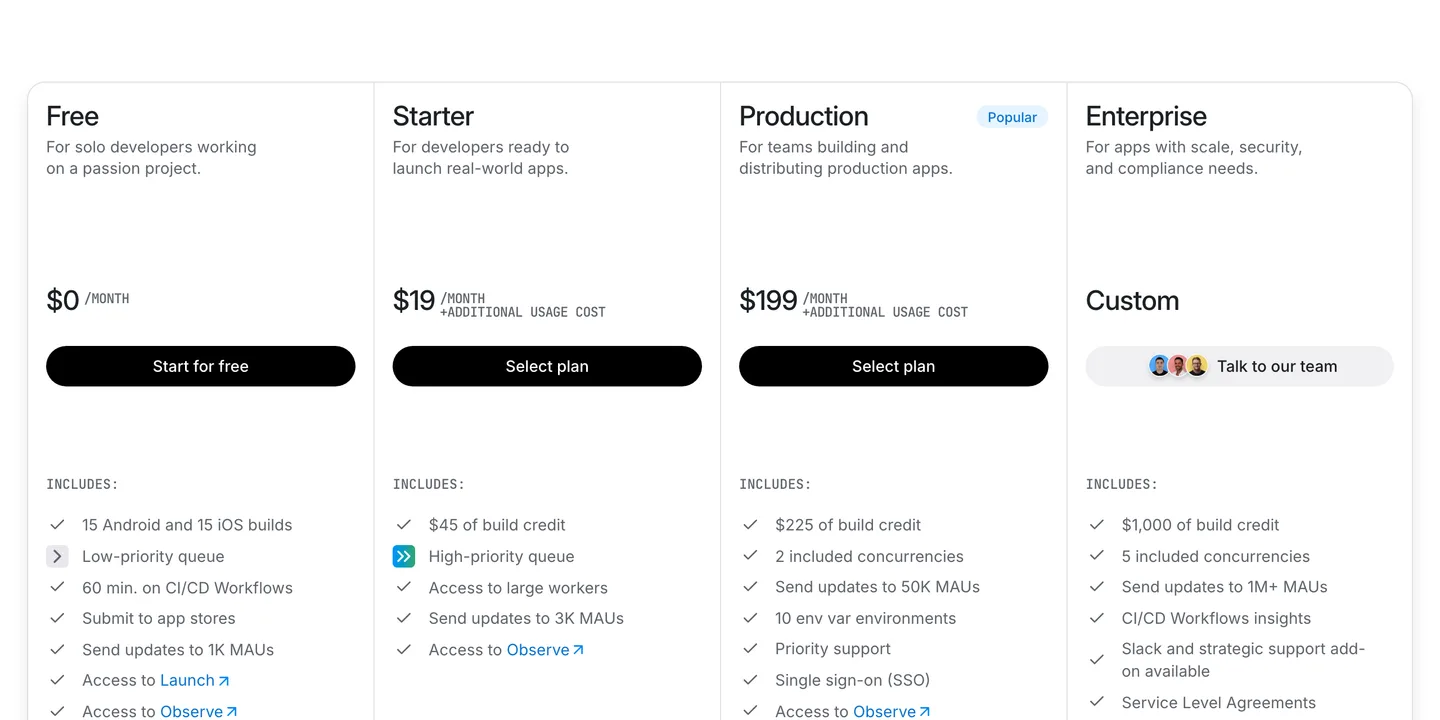
Expo's plans as of October 2026. The free plan is enough to build and submit a first app. Source
Prices as of October 2026.
Store fees and commission
Publishing is not free, but it is cheap. Apple charges $99 a year for the Apple Developer Program, and Google charges a one-time $25 registration fee. Stop paying Apple and your apps come off the App Store.
When you sell something, the stores take a cut. Apple's standard commission is 30%, but the App Store Small Business Program drops it to 15% for developers who earned up to $1 million in the previous year, and new developers qualify. You have to enroll; it is not automatic.
Google's rates now depend on the region. In the US, UK, EEA, Japan and Australia, auto-renewing subscriptions are charged 10% plus a 5% billing fee. Elsewhere, Google charges 15% on the first $1 million a year and 15% on subscriptions. For a first app, plan on roughly 15% on both stores.
Backend
Your app needs somewhere to keep user accounts and data. Supabase's free plan includes a 500 MB database and 50,000 monthly active users, but free projects pause after a week of inactivity, which is fine while building and not fine once people rely on it. The Pro plan starts at $25 a month and includes $10 of compute credits, which covers one small database instance. Budget $25 a month from launch.
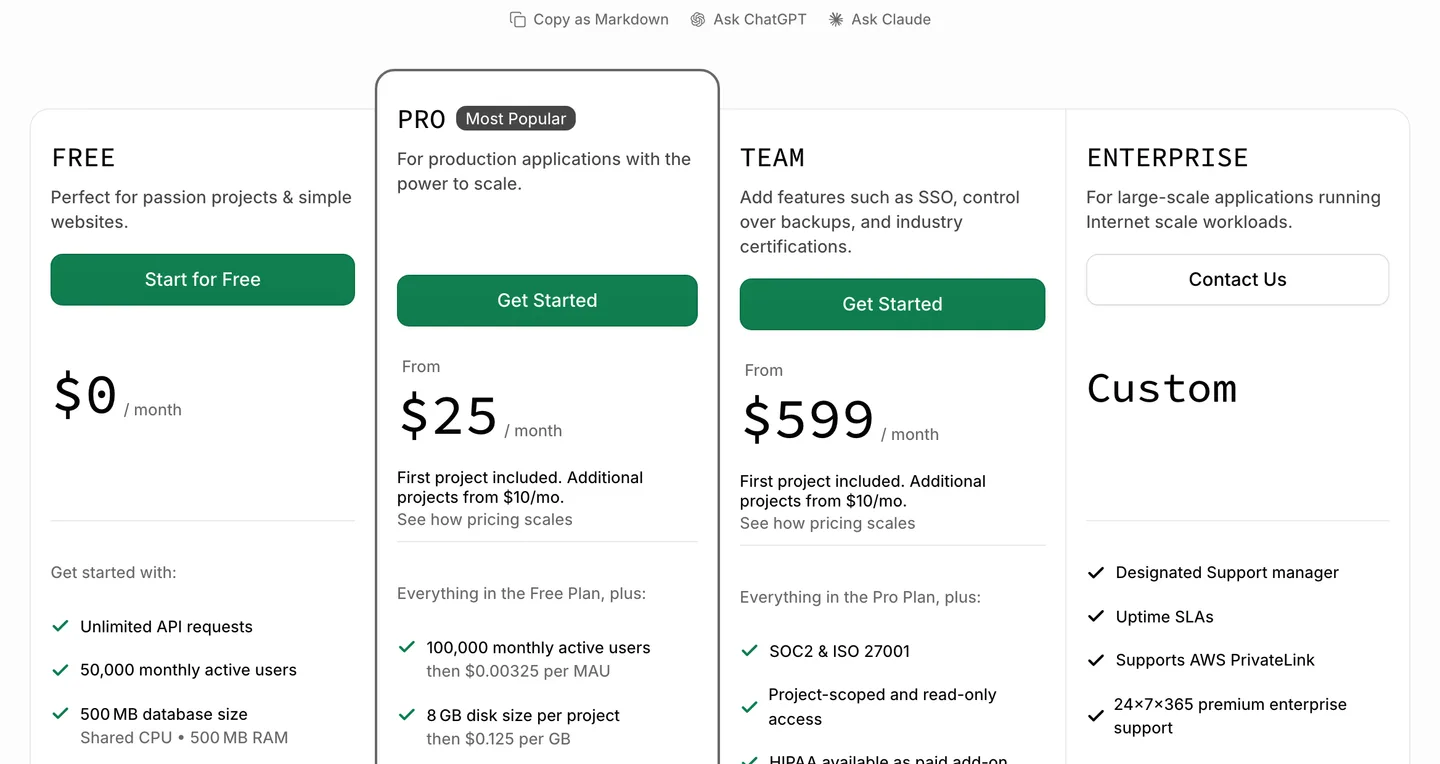
Supabase's plans as of October 2026: free while you build, $25 a month for a live app. Source
AI API usage
If your app has AI features, you pay the model provider per token. A worked example with Claude Haiku 4.5 at $1 per million input tokens and $5 per million output tokens: a chat message with about 2,000 tokens of context and a 500-token reply costs around $0.0045. A thousand of those a month is about $4.50.
That is why a small app's AI bill is usually single or low double digits, and why a free quota matters. Without a limit on free users, one enthusiastic person can cost more than they will ever pay you. NativeExpress enforces its free quota on the server for exactly this reason.
Payments, builds and the rest
RevenueCat, which handles in-app subscriptions across both stores, is free until you track $2,500 in monthly revenue and then takes 1%. Expo's EAS free plan includes a monthly allowance of 15 iOS and 15 Android builds and updates for up to 1,000 monthly active users. The $19 Starter plan adds build credit and a priority queue, which you may want during the launch week when you are building several times a day.
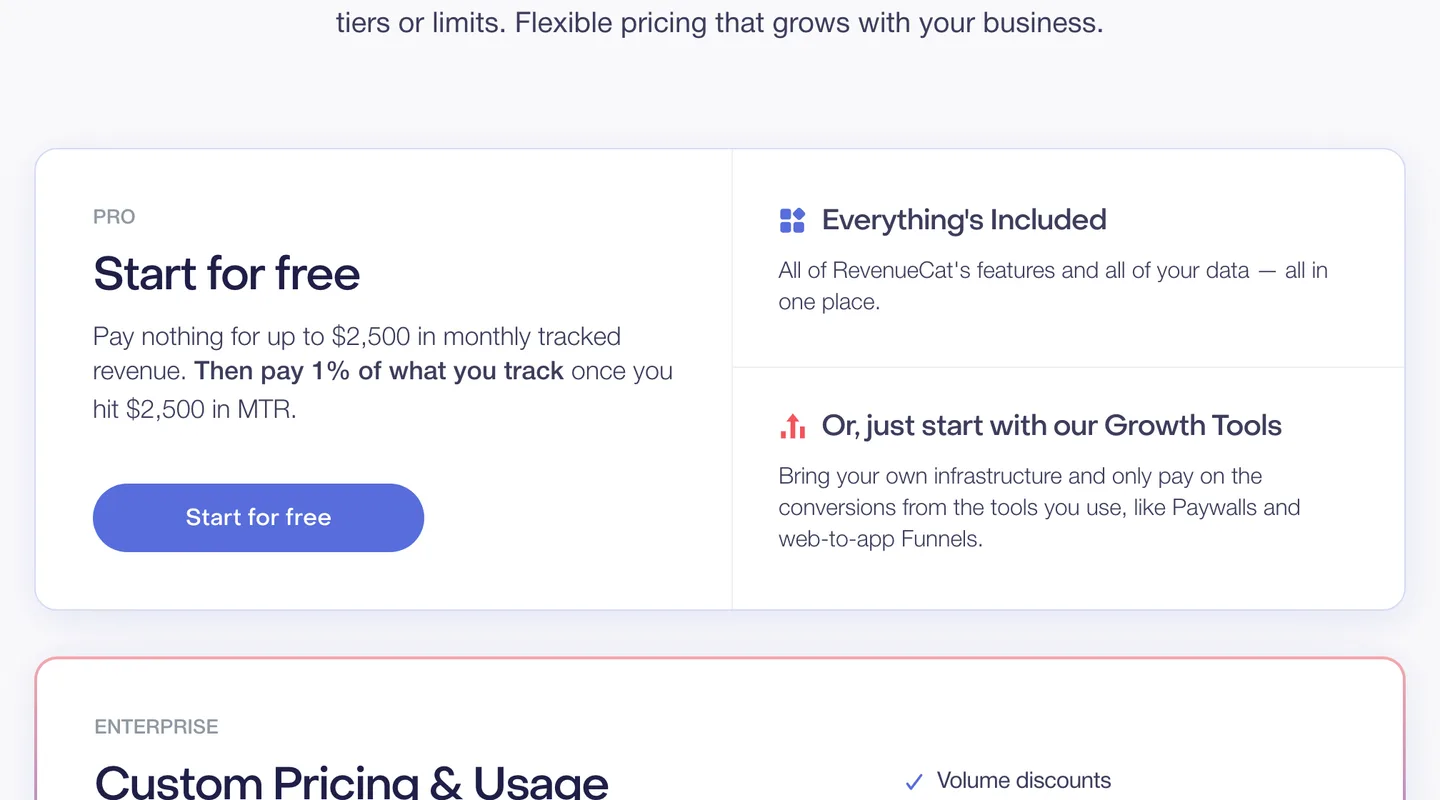
RevenueCat's pricing: nothing until you track $2,500 a month, then 1% of revenue. Source
A domain runs about $11 a year for a .com, and you need one for the privacy policy and support URL both stores ask for. Design can cost nothing if you start from a template and generate the icon, or a few hundred dollars for a designer to polish the icon and store screenshots.
The hidden costs of app development
The quotes you collect will mostly cover building version one. These are the costs that show up after.
Maintenance and OS updates
An app is never finished, because the platforms keep moving. Since April 28, 2026, Apple requires every upload to be built with Xcode 26 and the iOS 26 SDK. From August 31, 2026, Google Play requires new apps and updates to target Android 16 (API level 36). Miss a deadline and you cannot ship updates, including bug fixes.
Every one of those requirements means updating dependencies, rebuilding and retesting. With an agency or freelancer, that is paid work, often on a retainer. Doing it yourself, it is a few evenings a year, which is easier on a maintained codebase: NativeExpress tracks the latest stable Expo and React Native versions, and earlier versions stay tagged so a shipped app keeps building until you choose to upgrade.
Your time
Your time is the cost nobody puts in the quote. Even with an agency, you write the brief, answer questions, review builds, fill in store listings and respond to App Review. With an AI builder or a coding agent, you do more of it yourself.
It is worth being honest about how long this takes. One of our customers put it plainly:
NativeExpress was exactly what I needed, allowed me to launch a fairly complex mobile app in 3 months.
 Matthew L.Founder of PolyM
Three months for a fairly complex app is fast. It is not a weekend.

Marketing
Getting into the store does not get you users. Whatever you spend building, budget time or money for the launch: a landing page, short videos, a few posts where your users already are. Our guide on how to make money with an app covers this side.
So which route should you pick?
Pick an agency if you have a written spec, a budget above $25,000, and would rather pay than spend your evenings on it.
Pick a freelancer if your budget is closer to $10,000 and you can manage one person well. Own the repository from the start.
Pick an AI app builder to test whether anyone wants the idea, cheaply and quickly. Check before you commit whether you can publish to both stores and take your code with you.
Build it yourself with a coding agent if you want to own the code, keep changing the app after launch without an invoice each time, and are willing to put in the hours. A starter kit removes the weeks of setup that every app needs and nobody notices, so the agent works on your features. See what ships on the Expo starter page, or compare tiers on pricing.
Once it is built, our guide on how to publish an app on the App Store walks through review and release.
FAQ
Can I build an app for free?
Almost. Expo, React Native and Supabase all have free tiers, and you can build and test an app on your own phone without paying anything. The first unavoidable costs come when you publish: $99 a year for Apple and $25 once for Google. A coding agent subscription is optional but makes the work much faster.
How profitable is an app?
Usually less than people hope. RevenueCat's analysis of over 115,000 subscription apps found the median app earns about $72 a month one year after launch, while the top 10% earn $2,574 or more, and only 4.6% of new apps reach $10,000 a month within two years. The distribution is extremely skewed, which is a good reason to keep your build cost low until the app proves itself.
Do I need an LLC to start an app?
Not to publish one. Apple lets you enroll as an individual, in which case your legal name appears as the seller on the App Store. Enrolling as an organization requires a recognized legal entity, a D-U-N-S number and a public website. Whether you should form a company for liability or tax reasons depends on your country and situation, so ask an accountant or lawyer; this is not legal advice.
How much is an app with 10,000 users worth?
There is no honest single number, because user count alone does not set the value. Buyers look at revenue, profit, how fast it is growing, how many users stay and pay each month, and how much work it takes to run. An app with 10,000 free users and no revenue may be worth little, while one with fewer users who pay every month can be worth much more.
Does it cost money to publish an app?
Yes. Publishing on the App Store requires the Apple Developer Program at $99 a year, and Google Play requires a one-time $25 registration fee. Both stores also take a commission on paid apps and in-app purchases, typically 15% for small developers on subscriptions. There is no fee per app you publish.