
Best Vibe Coding Tools in 2026, Sorted by Control

The best vibe coding tools in 2026 are Claude Code, Codex and Cursor if you want to own the code, and Lovable, Bolt or Rork if you want an app on screen tonight without installing anything. To ship something people pay for, you also need the unglamorous pieces: a starting codebase, a database like Supabase, and a way to build and host (Expo's EAS for mobile, Vercel for web).
Most "best vibe coding tools" lists put all of these in one ranked column, as if Gemini CLI and Lovable were competing for the same job. They aren't. The useful question is how much control you want to keep, because that decides what happens in month three, when the app works and you want to change something the tool did not plan for.
So this guide sorts the toolkit into three groups: agents that work in your own codebase, platforms that host the whole thing for you, and the supporting services every shipped app ends up needing. Prices are as of October 2026, taken from each tool's own pricing page.
What counts as a vibe coding tool
Andrej Karpathy coined the term in a February 2025 post describing a way of coding where you "fully give in to the vibes" and "forget that the code even exists". You describe what you want, the AI writes it, you run it and react to what you see.
In practice that covers two kinds of software. Some tools edit files on your computer and you decide what to keep. Others run the whole project in a browser tab and you never see a file unless you ask. Both count. They just fail in different ways, and they cost different amounts once you prompt every day. If you are new to the idea, what is vibe coding covers the background.
Vibe coding tools at a glance (as of October 2026)
| Tool | Group | Free tier | First paid plan | Who owns the code |
|---|---|---|---|---|
| Claude Code | Agent in your codebase | No | Claude Pro, $20/mo | You |
| Codex | Agent in your codebase | Yes, light use | ChatGPT Go $8/mo, Plus $20/mo | You |
| Cursor | Agent in your codebase | Yes, limited agent | Pro, $20/mo | You |
| Devin Desktop (formerly Windsurf) | Agent in your codebase | Yes, light quota | Pro, $20/mo | You |
| Gemini CLI | Agent in your codebase | 1,000 requests/day | Optional | You |
| GitHub Copilot | Agent in your codebase | Yes, limited | Pro, $10/mo | You |
| Lovable | Prompt-to-app | 5 credits/day | Pro, $25/mo | Exportable |
| Bolt | Prompt-to-app | 1M tokens/mo | Pro, $25/mo | Exportable |
| Replit | Prompt-to-app | Not listed | Core, $20/mo | Exportable |
| v0 | Prompt-to-app | 7 messages/day | Plus, $30/mo | Exportable |
| Rork | Prompt-to-app (mobile) | Design mode only | Pro, $20/mo | GitHub sync on paid plans |
Group 1: AI coding agents in your own codebase
These keep the most control in your hands. The code sits in a folder on your machine (and in your GitHub account), the agent reads and edits it, and you can switch agents next month without moving anything. The price of that control is setup: you install a tool, open a terminal or an editor, and run the app yourself.
For a first-timer this sounds harder than it is. You type a request in plain English, the agent proposes changes, you look at the result. The difference from a browser builder is that nothing stops you when the app grows past what a template expected.
Claude Code
Claude Code is Anthropic's agent. Its docs describe a tool that reads your codebase, edits files and runs commands, and it works in the terminal, in VS Code and JetBrains, in a desktop app and in the browser. It is included in Claude Pro at $20 a month, or $17 billed yearly, and in Max from $100. The free Claude plan does not include it.
It is our default for long tasks on a real codebase, where the agent has to read a lot of files before it changes one. It also reads project skills, which matters more than it sounds: a skill tells the agent where code goes and how your project does things, so it stops inventing its own conventions. We cover that in Claude Code skills for mobile apps.
Codex
Codex is OpenAI's coding agent, available as a CLI, an IDE extension, a cloud agent and inside the ChatGPT apps. It is bundled into ChatGPT: OpenAI's pricing docs say Codex is included in Free, Go, Plus, Pro, Business, Edu and Enterprise, with Go at $8 a month for "lightweight coding tasks" and Plus at $20. If you already pay for ChatGPT, you already have it.
Codex and Claude Code are close enough that the choice comes down to how you like to work and which model you trust on your codebase. We compared them in detail in Codex vs Claude Code.
Cursor
Cursor is a full code editor (a fork of VS Code) with an agent built in. If you want to see the files, click through them and review each change as a diff before accepting it, Cursor is the most comfortable place to vibe code. The Hobby plan is free with limited agent requests, and Pro is $20 a month.
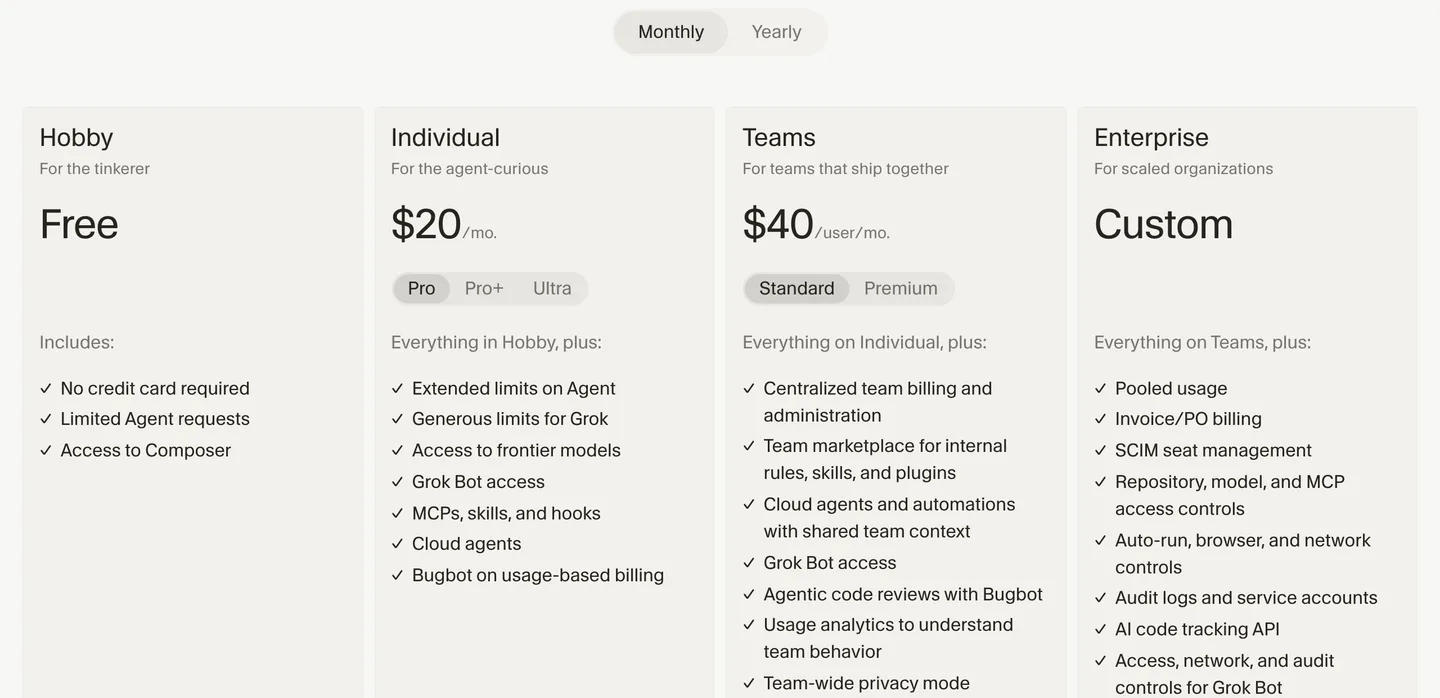
Cursor's plans as of October 2026. Pro is $20 a month; Cursor's docs list Pro+ at $60 and Ultra at $200 for more included usage. Source
According to Cursor's pricing docs, the higher tiers give you more included usage on the same models, and which model you pick changes how fast you burn through it. Start on Pro and only move up if you hit the limit every month.
Devin Desktop (formerly Windsurf)
If you are looking for Windsurf, it has a new name. Cognition, which owns Windsurf, renamed the editor Devin Desktop, and windsurf.com now redirects to devin.ai. It is still an AI editor in the same family as Cursor, now with an agent command center for running several agents at once.
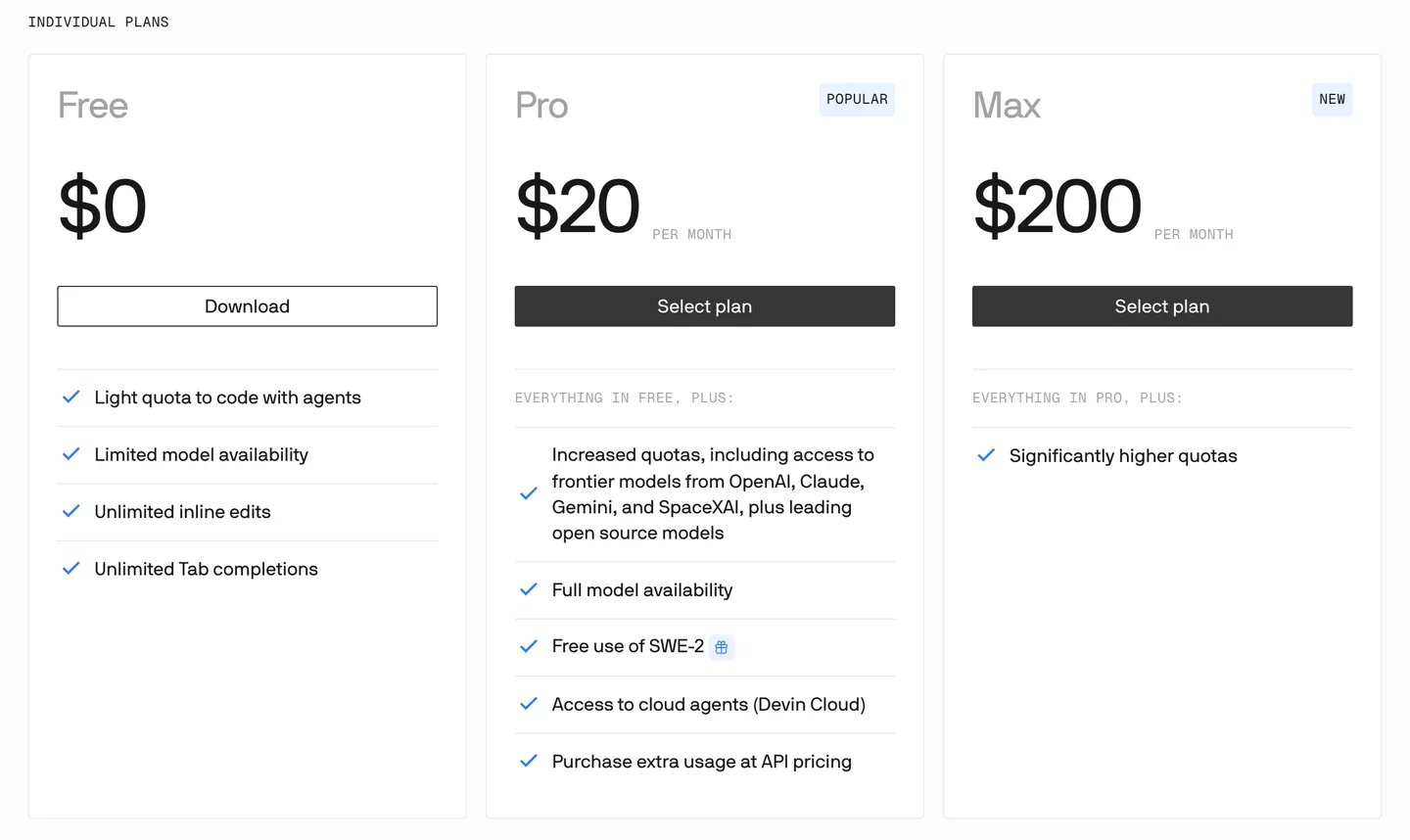
Devin Desktop's individual plans as of October 2026. Existing Windsurf users moved to these plans. Source
Free gives you a light agent quota; Pro is $20 a month and Max is $200. It is a reasonable alternative to Cursor, but with the product in the middle of a rebrand, we would pick Cursor for a first project unless you already use it.
Gemini CLI
Google's Gemini CLI is the cheapest way to try a terminal agent. It is open source under Apache 2.0, and signing in with a personal Google account gets you a generous free tier.
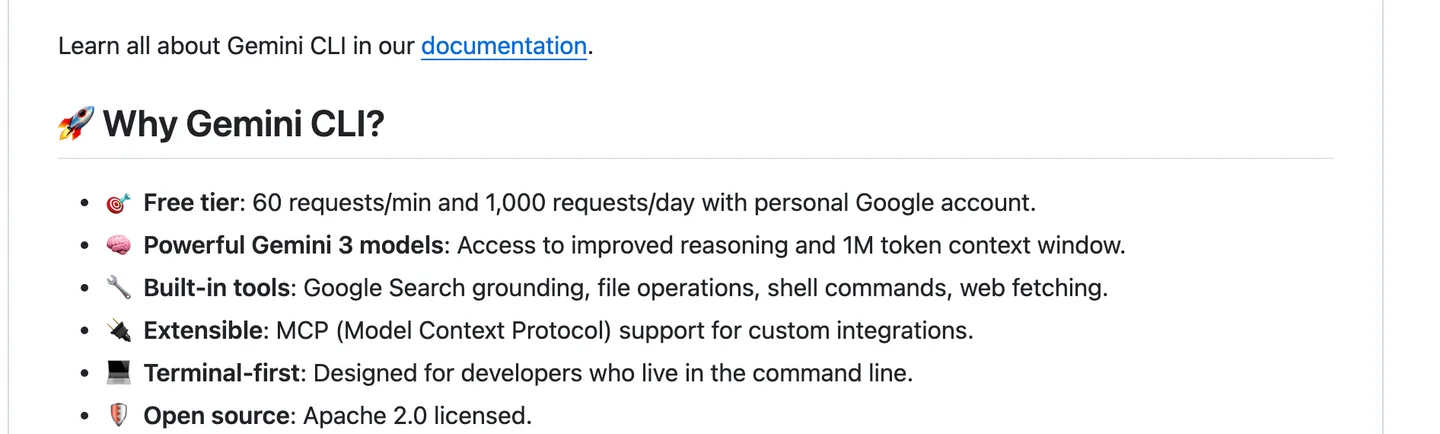
Gemini CLI's free tier as listed in its README, October 2026. Source
That is plenty to learn on. You can start without installing anything permanent:
npx @google/gemini-cliGitHub Copilot
Copilot started as autocomplete and is now an agent too: agent mode in VS Code, a CLI, and a cloud agent you can hand tasks to. Agent use now draws on monthly AI credits included in each plan. Free covers limited chat and agent use, Pro is $10 a month with the cloud agent and access to third-party agents like Claude Code and Codex, and Pro+ is $39.
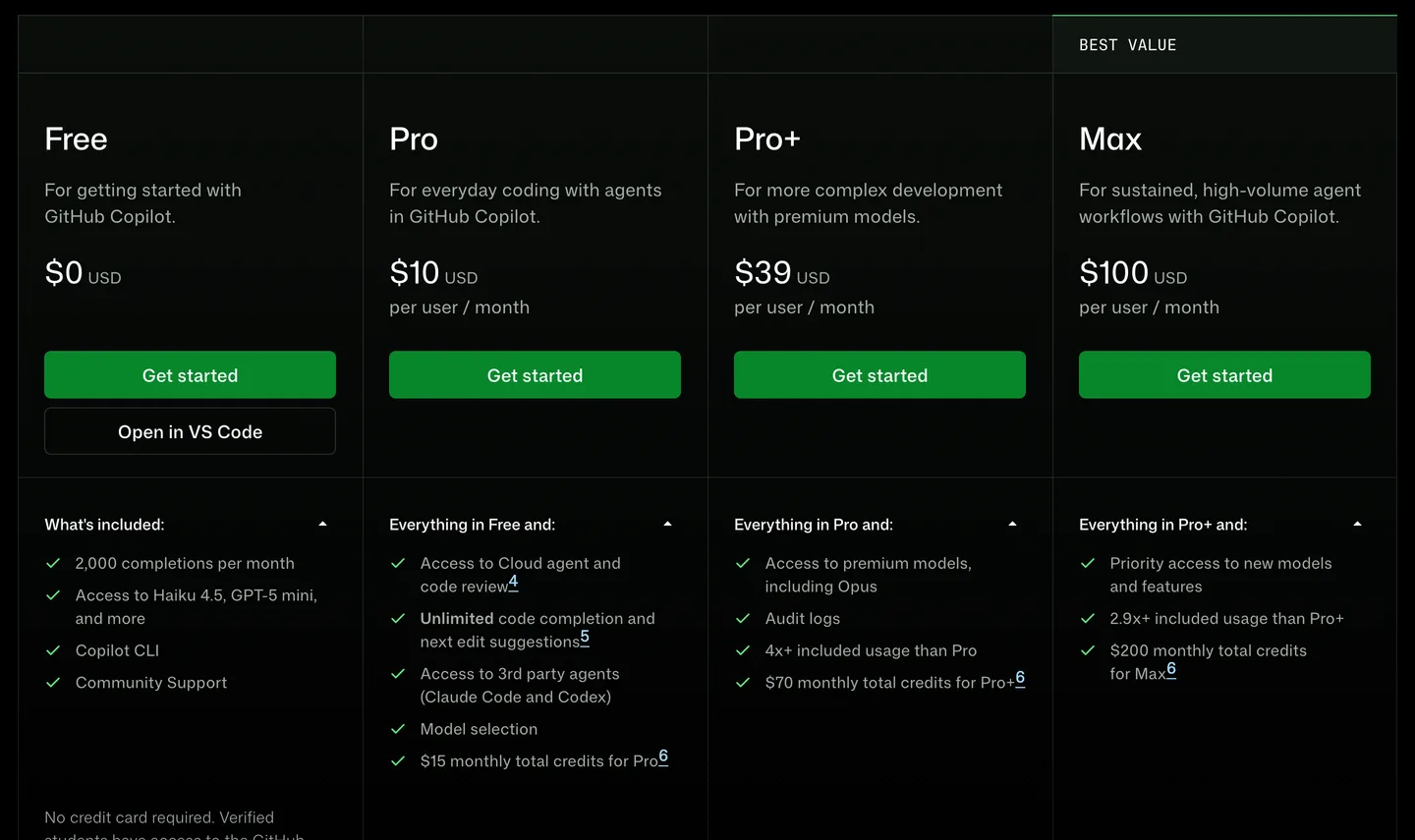
GitHub Copilot's individual plans as of October 2026. Agent usage draws from monthly AI credits. Source
Copilot is the cheapest paid option on this list and a sensible pick if your code already lives on GitHub. For a beginner building a whole app from scratch, we would still start with Claude Code, Codex or Cursor, which are built around the agent first.
Group 2: prompt-to-app platforms
These keep the least setup and, in exchange, more of the control sits with the platform. You type a description into a browser, the platform writes the code, runs it and hosts it. No terminal, no installs. They are the fastest way to see an idea work, and most let you export the code later.
The trade-off is credits. Every message costs something, and fixing a bug the AI introduced costs the same as building a feature. We go deeper on each one in the best AI app builders, and on the mobile ones in the best mobile app builders. Short version:
- Lovable: the most polished for web apps. Free gives 5 credits a day; Pro is $25 a month for 100 credits. It builds web apps, not native mobile apps (here is why that matters).
- Bolt: free with 1M tokens a month, Pro at $25 for 10M. Good for web, and it starts an Expo project when you ask for mobile.
- Replit: a full cloud workspace with an agent, databases and hosting in one place. Core is $20 a month ($18 billed yearly).
- v0: Vercel's builder, strongest at React and Next.js interfaces. Free allows 7 messages a day; Plus is $30 a month in credits.
- Rork: the mobile specialist. Free is design-only; Pro at $20 a month builds iPhone apps in SwiftUI and Android apps in Kotlin.
If you are choosing between these, Lovable alternatives compares them head to head.
Group 3: the pieces you need to ship
This is the group most vibe coding tool lists skip, and it is where first projects stall. The agent can write a sign-in screen in a minute. Making sign-in actually work (with Apple and Google, password reset, account deletion, sessions that survive a restart) takes days of back and forth, and so do payments, push notifications and a store submission. None of that is the interesting part of your app.
A starter codebase
An agent working from an empty folder makes every architectural decision itself, one prompt at a time, and rarely the same way twice. An agent working inside a finished codebase follows the patterns already there. For a web app that can be an official template from your framework. For a mobile app you want to charge for, it should already include auth, subscriptions and the store setup.
That is the job NativeExpress does for mobile. It is a React Native and Expo starter you buy once and own, delivered as a private GitHub repository. Sign-in with Google, Apple and email is finished, RevenueCat subscriptions are wired with the entitlement checked on the server, and three AI features (chat, image generation and a scanner) run on Supabase Edge Functions. It also ships agent skills for setup, design, conventions, store assets and submission, so Claude Code, Cursor, Codex or Gemini CLI read how the project works before writing a line.
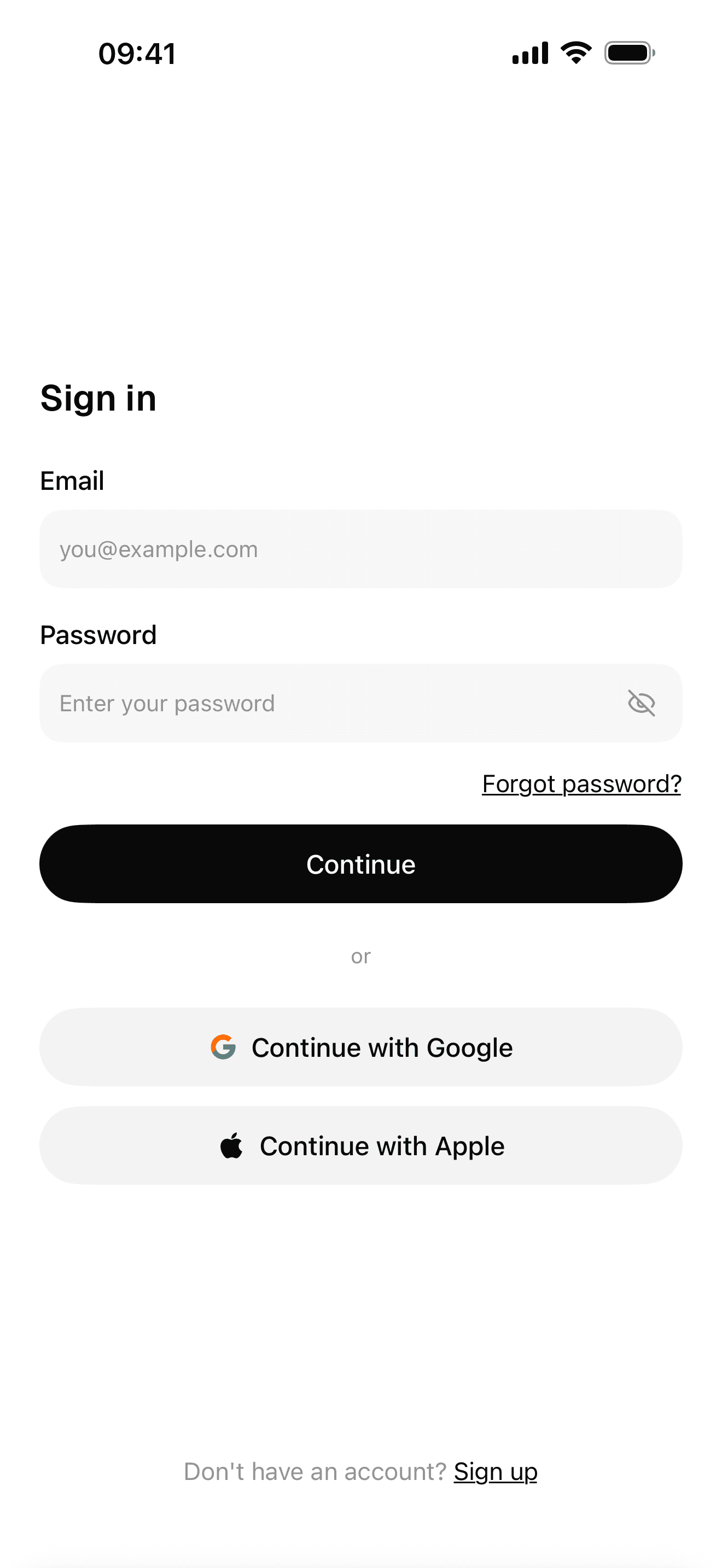
Sign-in with Google, Apple and email
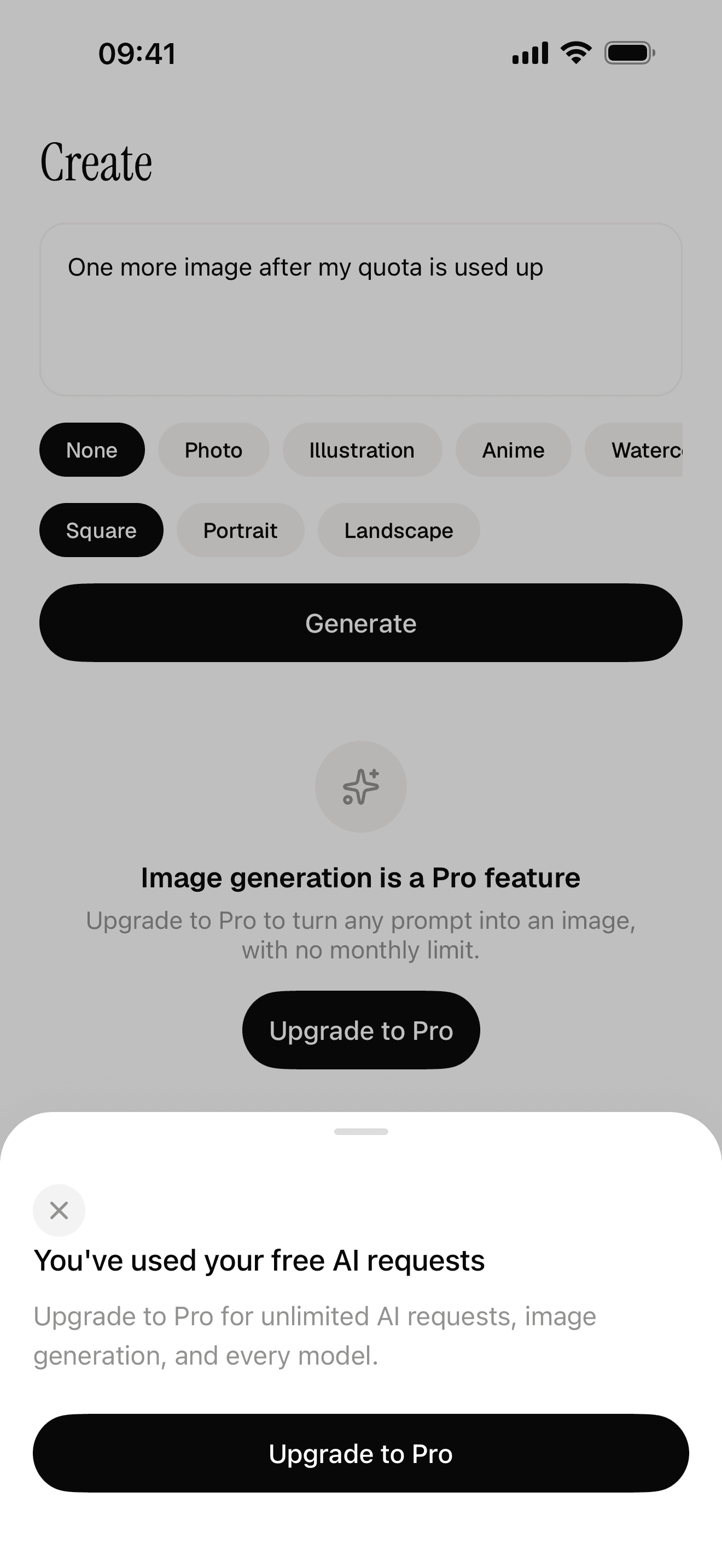
Free quota and a paywall the server decides
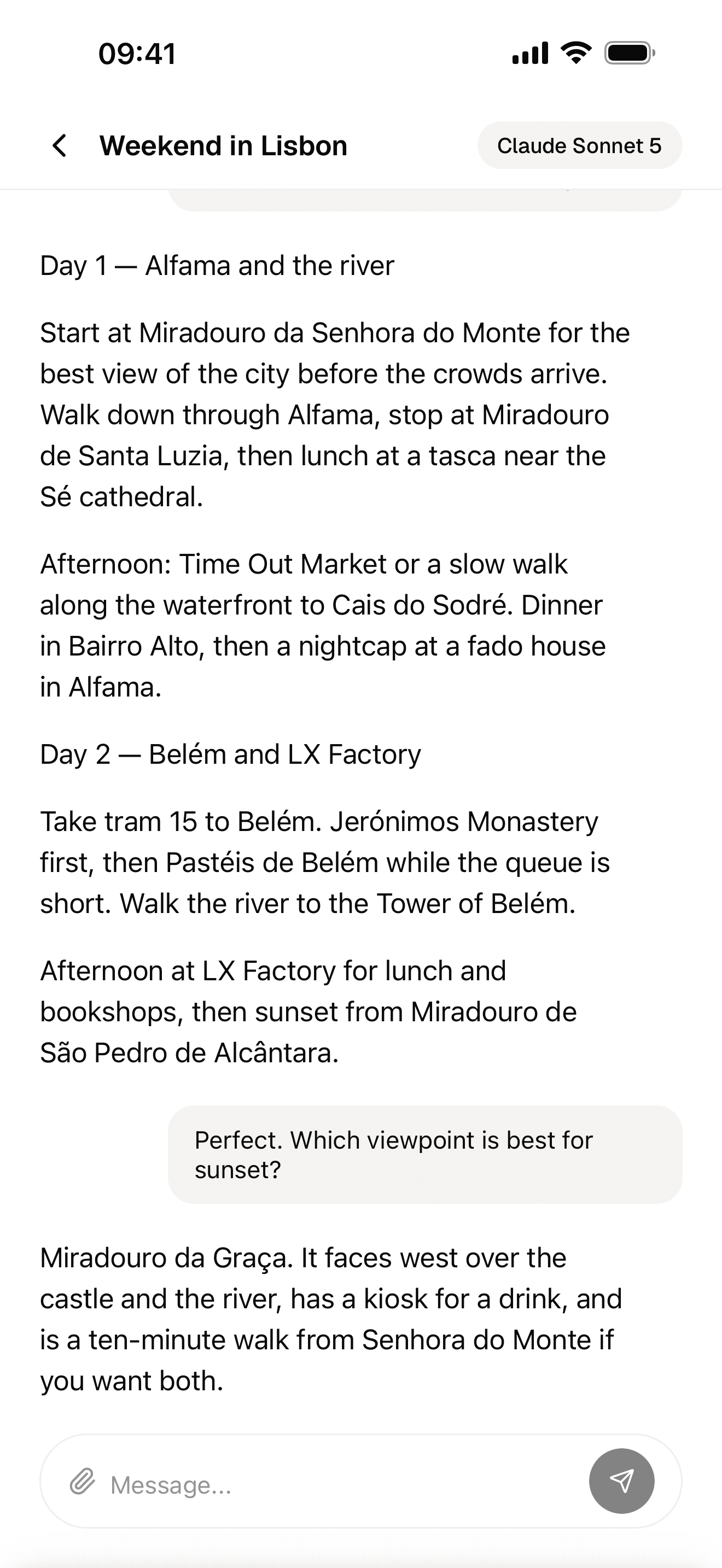
Streaming AI chat
You still do real work. Your agent writes most of the code; you make the decisions, sign in to services when asked, and test on your phone. No mobile experience is needed, but if you have never opened a terminal, budget an evening for setup.
Supabase
Most vibe-coded apps need a database, user accounts and file storage, and Supabase is the default for good reason: Postgres, auth, storage and server functions in one project. The free plan covers 50,000 monthly active users and a 500 MB database, with one catch to know about: free projects pause after a week of inactivity. Pro starts at $25 a month when you launch.
Coding agents have seen a lot of Supabase code, which in our experience means fewer made-up APIs.
Expo and EAS
For mobile, Expo is the framework and EAS is the build service that turns your code into an app the stores accept, without needing a Mac for iOS builds. The free plan includes 15 Android and 15 iOS builds a month and submission to the stores; Starter is $19 a month plus usage. If you are new to the ecosystem, Expo vs React Native CLI explains why almost every new project starts on Expo now.
You also need your own Apple Developer account at $99 a year and a Google Play account at $25 once. No tool on this page pays those for you.
Vercel
For web apps, Vercel hosts a Next.js project from a GitHub push in a couple of minutes. Hobby is free, but Vercel's docs say it is limited to non-commercial, personal use, so a product you charge for belongs on Pro at $20 a month.
Which vibe coding tool is best for your goal?
Rankings are less useful than a decision. Here is what we would pick.
Your first web app
If you just want to see whether the idea works, start in Lovable or v0 and spend the free credits. If you already suspect you will keep it, start in Cursor (or Claude Code) with a Next.js template, Supabase and Vercel. The second path takes an evening longer and saves you a migration later.
Your first mobile app
For a prototype you can hold in your hand this weekend, Rork is the quickest route. For an app you want in the App Store and Google Play and plan to keep improving, use Claude Code or Cursor on an Expo codebase and build with EAS. How to vibe code an app walks through that path step by step, and how to make an iPhone app covers the Apple side.

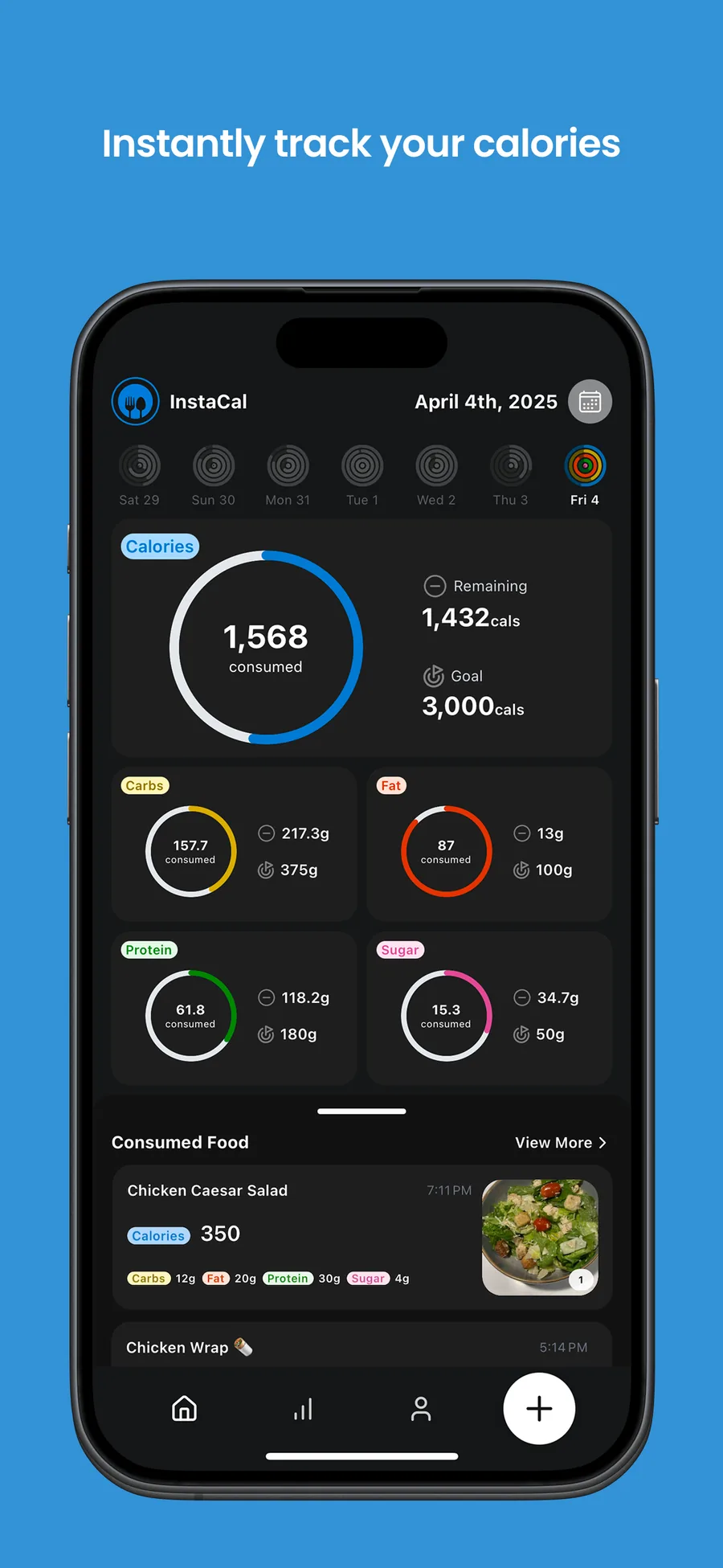
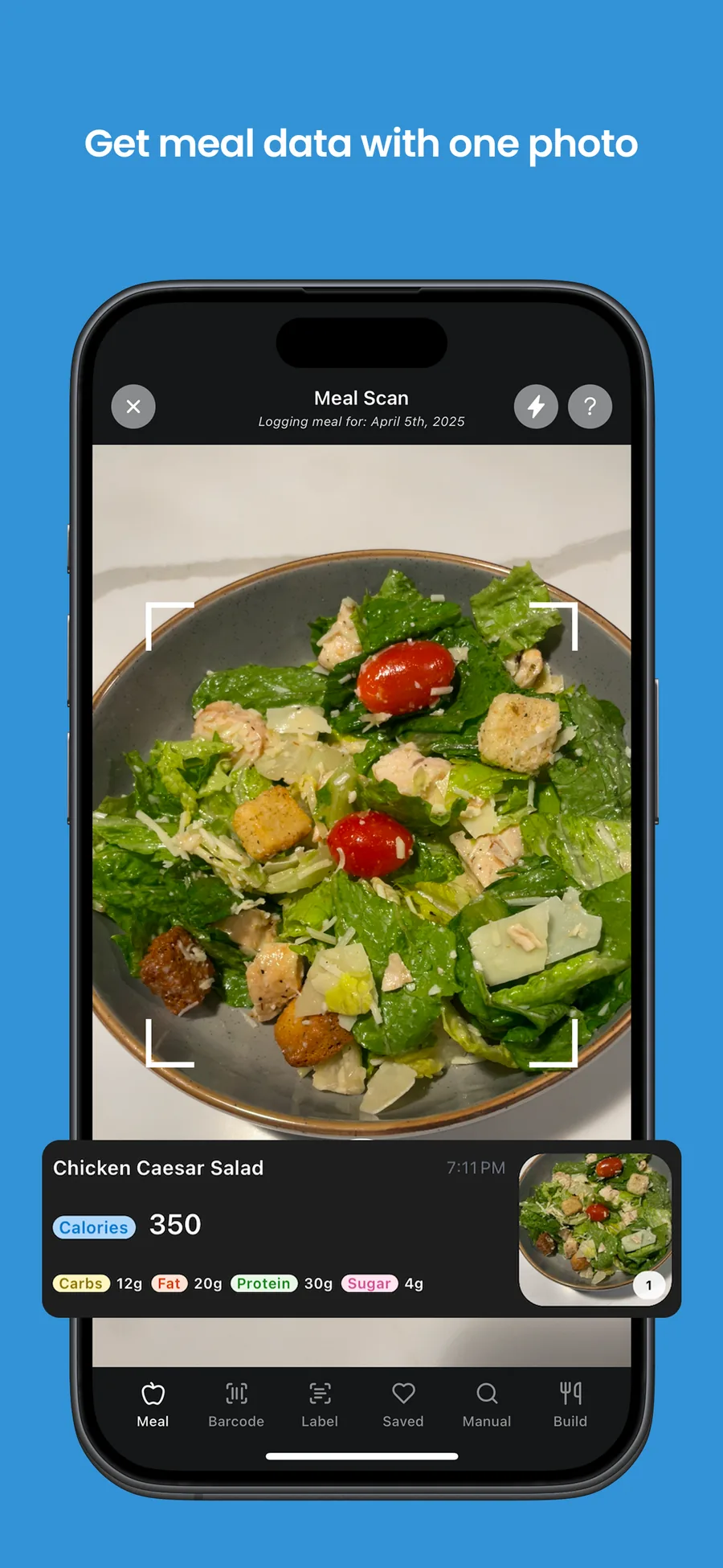
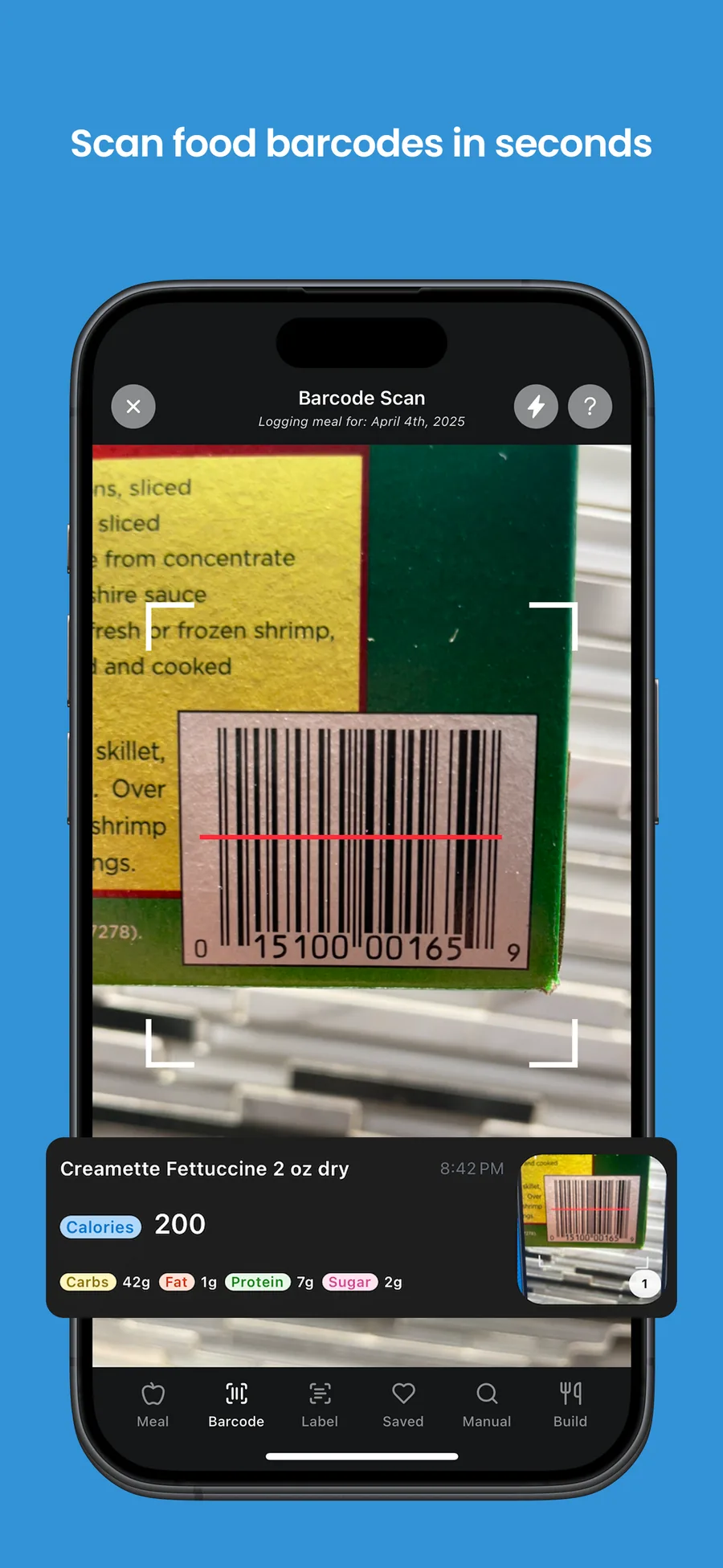
InstaCal, a calorie tracker, is one of the apps built on NativeExpress and already in the App Store.
A paid product
Own the code. Pick an agent (Claude Code if you want the strongest at long multi-file tasks, Codex if you already pay for ChatGPT, Cursor if you want to review every diff in an editor), start from a codebase that already handles payments and accounts, and keep your data in your own Supabase project. When you are paying per message on a platform, a busy week of bug fixing gets expensive. With your own code, you pay a flat agent subscription and the infrastructure costs only grow with real users. How much it costs to make an app breaks down the full first year, and how to make money with an app covers pricing it.
NativeExpress was exactly what I needed, allowed me to launch a fairly complex mobile app in 3 months.
 Matthew L.Founder of PolyM
FAQ
What tools do you need for vibe coding?
At minimum, one AI tool that writes and runs code: either a coding agent like Claude Code, Codex or Cursor working in a folder on your computer, or a browser platform like Lovable or Bolt. To ship something real you will also want GitHub for version history, a database such as Supabase, and a way to deploy (Vercel for web, Expo's EAS for mobile). A starter codebase saves you rebuilding sign-in and payments.
What's the best way to learn vibe coding?
Build one small, complete thing and ship it, rather than starting five demos. Use Gemini CLI's free tier or a free Cursor plan, commit to git after every change that works so you can undo the ones that don't, and ask the agent to explain what it changed when you don't understand it. Our guide on how to vibe code an app is a good first project.
Is vibe coding really that easy?
The first version is. Getting a screen with your idea on it takes minutes now. The hard parts are the same as they always were: sign-in that handles edge cases, payments that are checked on a server, keeping user data private, and passing App Review. That is where most vibe-coded apps stall, and why starting from code that already handles those pieces matters more than which agent you choose.
What is the best vibe coding tool for beginners?
If you have never used a terminal, start with Lovable or Bolt to get a feel for prompting, then move to Cursor, which shows you every file and change in a familiar editor. If you are comfortable typing a few commands, Claude Code or Codex will take you further on a real project.
Is there a free vibe coding tool?
Yes. Gemini CLI gives 1,000 requests a day with a personal Google account, Codex is included in ChatGPT Free for light use, and Cursor, Devin Desktop, GitHub Copilot, Lovable, Bolt and v0 all have free tiers with tight limits. They are enough to learn on; most people move to a $20 plan once they build every day.